Psychometric tests for pilots
Pilot Psy 1 Test: Multitasking and Angles
By ForAllPilots · Published · 5 min read
Reviewed and approved by the site's editor before publication. Our method (FR)
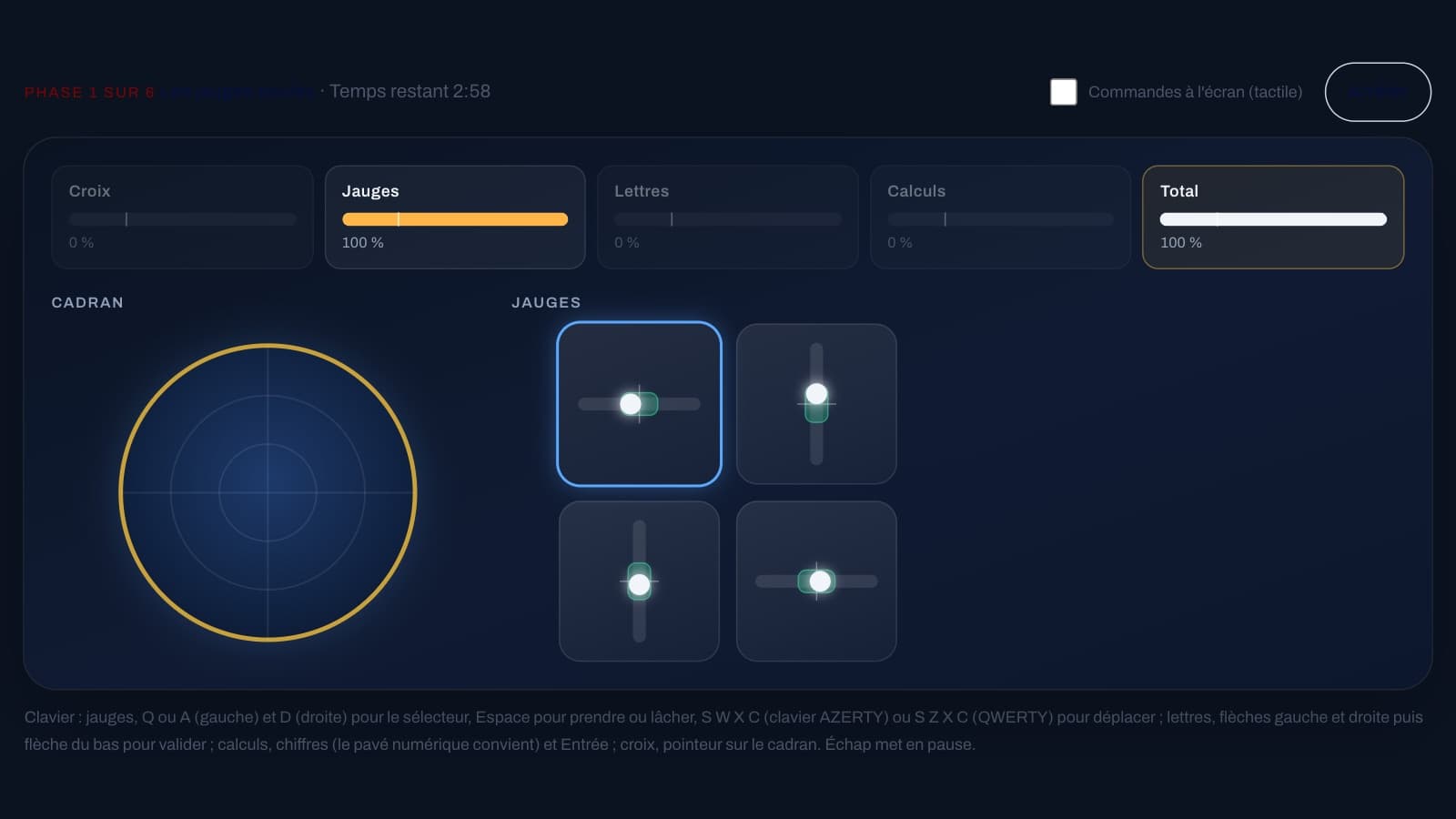
On ForAllPilots, two exercises carry the label “Psy 1 type”: the multitasking exercise and the angles exercise. The site states that this type of exercise is common to the “Psy 1” psychometric tests used by Air France, HOP and the ENAC, without being affiliated with any of these organisations. Here is what each of the two demands, how to train on them without spreading yourself too thin, and how to tell whether you're really making progress.
What “Psy 1” covers on the site
The term “Psy 1” works here as a label: within the psychometric tests section, multitasking and angles are the two exercises marked with this tag. The site's other exercises, even when they train similar abilities, do not carry this label. This page should therefore not be read as a description of a complete official test.
What can be stated is limited to what the site itself says: these are training exercises, not the official tests, and the exact rules or scoring scale may differ from those of a real selection process. For the duration, structure or scoring scale of an actual test, rely on the documentation provided by the organisation running it. What you can do here is work on the two abilities these exercises call on: dividing your attention between several tasks, and picturing an angle on a plane without getting the direction wrong.
Multitasking: juggling four tasks at once
The multitasking exercise combines four tasks: keeping gauges within their central zone, holding a cross inside a moving circle, spotting letters, and solving calculations. It runs over six phases of three minutes each. Phases 1 to 3 add one task at a time, then phases 4 to 6 bring all four together, with an announced split of attention between them.
The key point to remember is the scoring rule. Each task has its own performance bar, and the total drops to zero as soon as a single bar falls below its threshold line, set at 25%. The score for a phase is the average of the total over its three minutes, so every second spent at zero drags it down. It's better to handle four tasks correctly than to nail three perfectly and abandon the fourth. The goal isn't to go faster, it's to scan: gauges, cross, letters, calculations, then back to the gauges, without lingering more than a few seconds on a single task while the others drift.
Angles: direction before value
In the angles exercise, a clock face shows the positive direction of rotation, an angle value is displayed, and you must pick out, from five figures, the one that represents it. A series consists of 30 questions across three levels of ten: first angles in 45° increments, then angles greater than a half-turn, then intermediate values where an incorrect figure may be only a few degrees off from the correct one.
The clock face can be rotated, or even flipped, which reverses the positive direction: a +90° angle is then no longer a quarter-turn in the usual clockwise sense. The right reflex is to fix the direction at the start of each question, before looking at the figures. Every question includes a figure showing the correct angle in the wrong direction, and that's the most common trap. On the keyboard, keys 1 to 5 select a figure.
Two exercises, two ways to lose points
In multitasking, points are lost through neglect: a task left unattended for too long sends its bar below the threshold line and drags the total down to zero. In angles, points are lost through a lapse in applying a rule: a reversed direction, or a large angle not properly reduced to a simple one. The first demands attention sustained and distributed over time, the second a rule applied identically to every single question. In both cases, what makes the difference is a routine you can build: a scanning cycle for one, a checking order for the other.
This contrast is useful for training. If multitasking is giving you trouble, check the results screen: for each task, it shows the average performance and the time spent below the threshold line, which points to the one that's letting you down. If it's the angles, go back over the corrections: the correct figure turns green and your answer turns red, with an explanation of the angle's value and the direction to read.
A two-week training plan
Start with angles: the exercise is short, the rules are quickly learned, and the corrections, switched on by default, explain every mistake. Do two or three series of 30 questions over several days, aiming first for a consistent reflex on direction rather than speed.
Then move on to multitasking, one phase at a time: the Mode menu lets you play a single three-minute phase on its own. Repeat the early phases until the gauges no longer require conscious attention, then add the cross, the letters, and finally the calculations. Sessions of three to six minutes of play, with breaks in between, are worth more than a solid hour at a stretch.
In the second week, alternate one angles session with one multitasking session, and save the full six-phase run for once the isolated phases have become consistent. Do your series well-rested: a series done while tired tells you little about your actual level.
Measuring your progress without kidding yourself
Every completed series is scored and saved on your device. The statistics page shows, test by test, your best score, your average, your most recent score, and the curve of your series over time. A single result means almost nothing: a slip of the finger or a tiring day is enough to make it swing by several points. Look instead at the trend, for example the average of your last three series compared with the previous three.
Scores are given as classes: multitasking gives a class from 1 to 9 based on the exercise's scoring scale, and angles gives a class at the end of the series. This scale is the site's own, not that of an official test. If you stop a series before the end using the “Stop” button, it's kept as interrupted and doesn't count towards your statistics. Since everything is stored in your browser, your history disappears if you clear the site's data, and a different device starts from zero.
What these exercises are not
These are training exercises included with ForAllPilots' ATPL subscription, with no connection to Air France, HOP, the ENAC or any other organisation. They do not replicate an official test, they measure neither medical fitness nor flying skill, and a good score does not guarantee the outcome of a real selection process. Their value lies in helping you spot your own habits: where your attention slips, which reflex you forget under pressure, and what changes when you train a little every day.