Psychometric tests for pilots
PFD Flying Test: Keep the Pink Cross Centred
By ForAllPilots · Published · 6 min read
Reviewed and approved by the site's editor before publication. Our method (FR)
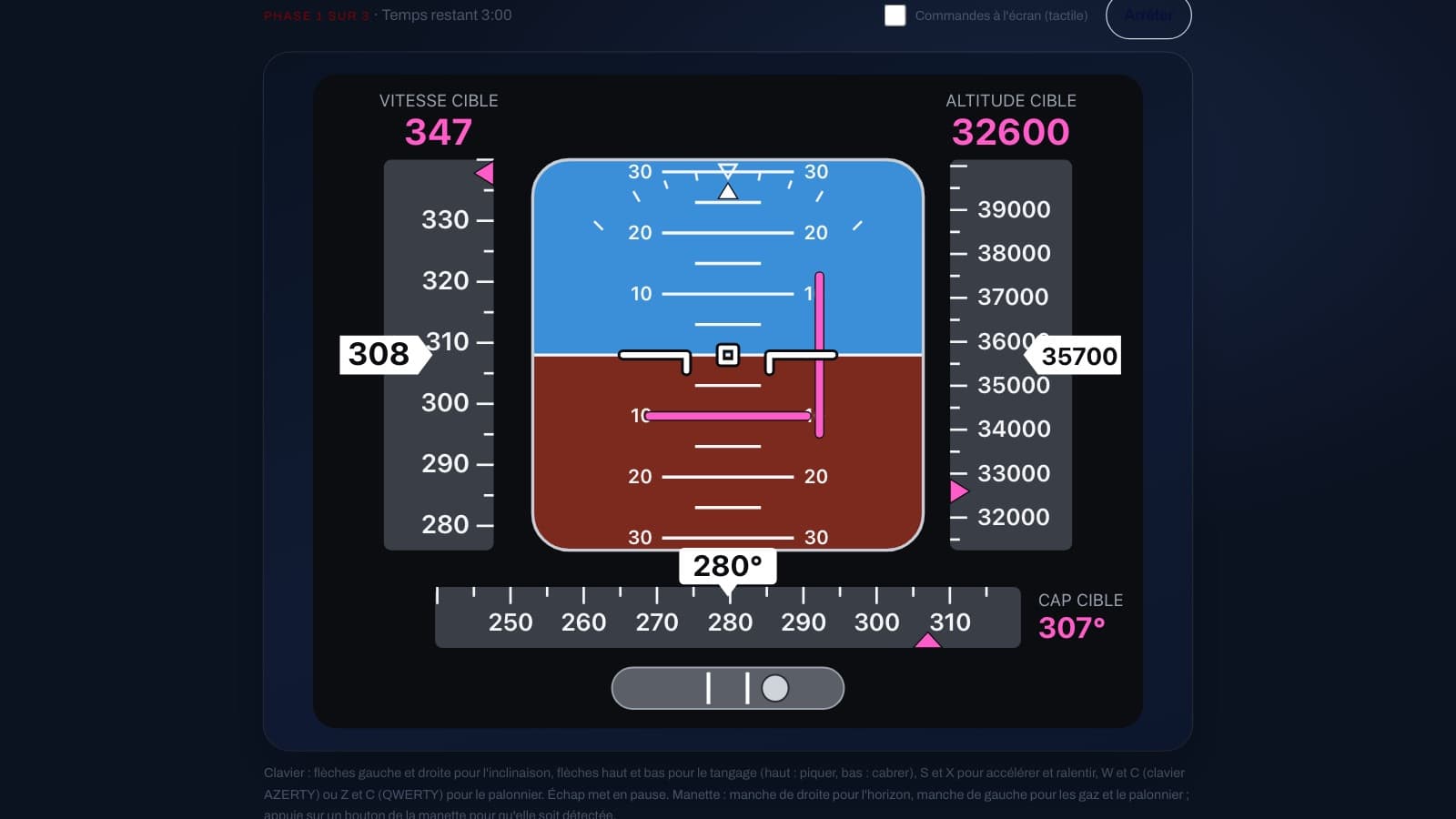
A flight display, a pink cross that shifts off-centre, a speed to set and a slip ball sliding to one side: the PFD flying test (the PFD is the primary flight display) lasts three minutes and asks you to hold three things at once. It requires no knowledge, only coordination and divided attention over 180 seconds. Here is how to read the display, which controls to choose, where points are lost and how to practise over two weeks.
What you are actually flying
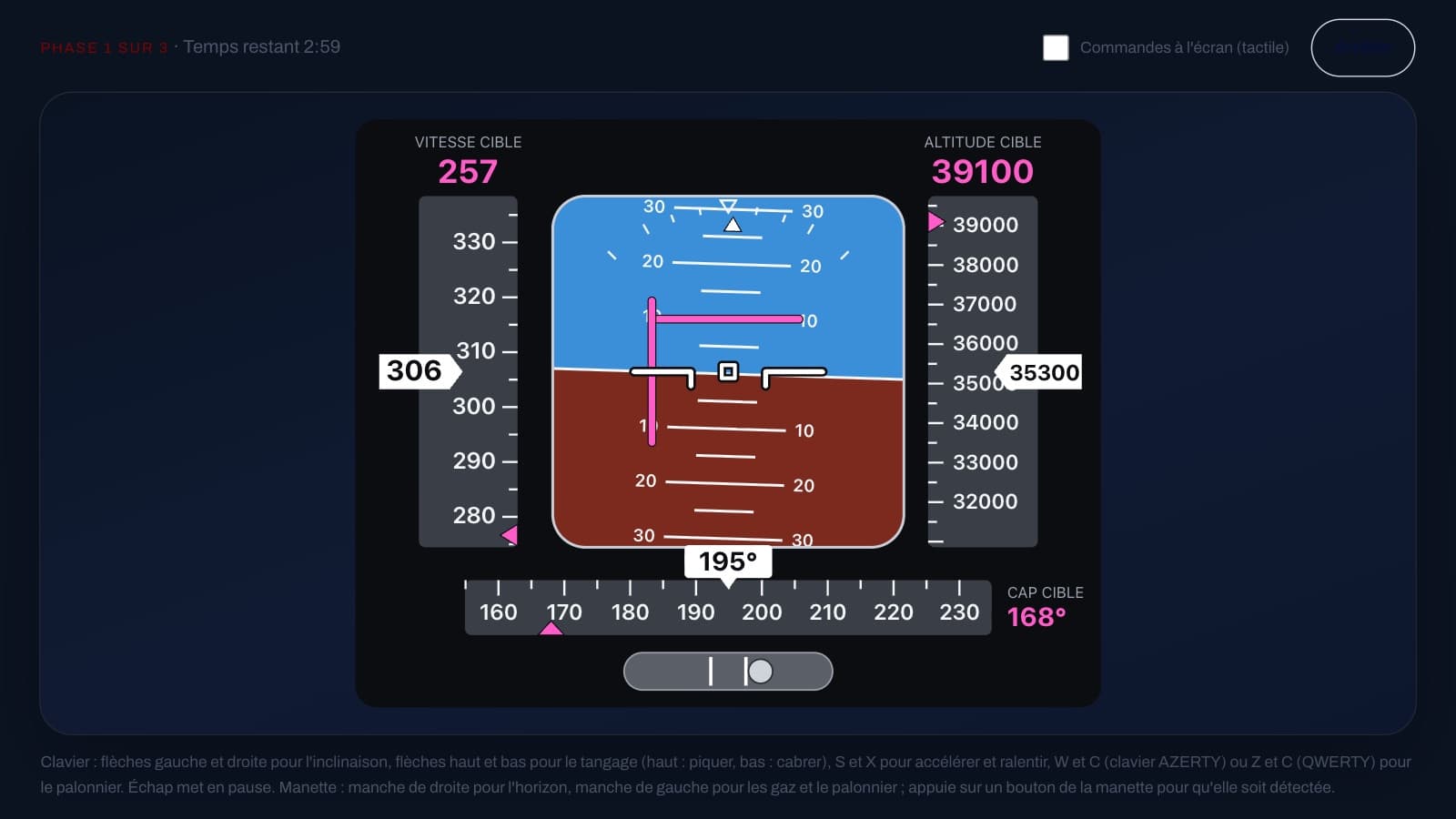
The screen reproduces a primary flight display: the airspeed tape on the left, the artificial horizon in the centre, the altitude tape on the right and, at the bottom, the heading and the slip ball. The target value is shown in pink above the airspeed and altitude tapes, and to the right of the heading. There is no need, however, to watch the heading and altitude targets: the pink cross of the flight director translates them into a single visual command, which you simply bring onto the small white aircraft symbol in the centre.
The horizontal bar above the centre asks you to pitch up more, below it to pitch down more; the vertical bar to the right of the centre asks you to bank further right, to the left further left. As long as the cross is centred, the aircraft is doing what it asks. The flight has three phases of one minute each, after a three-second countdown: new targets appear at one minute, then at two minutes, and the cross shifts off-centre again.
The pitch trap: push or pull?
As with a real control stick, pushing forward (up arrow) pitches the nose down and pulling back (down arrow) pitches it up. When the horizontal bar is above the centre, you therefore have to pitch up, that is, pull back: down arrow. This reversal is costly in the first flights, because the reflex is to push the cross upwards with the up arrow. If this direction does not suit you, the "Invert pitch" switch on the start screen reverses it, and your choice is kept on this device.
Decide in the very first session and do not change it: relearning a reflex twice costs more than accepting an imperfect direction. For roll, the rule is straightforward: vertical bar to the right of the centre, right arrow. During the first flights, say the instruction to yourself under your breath, "bar above, I pull; bar to the right, I bank right", until the movement becomes automatic.
Keyboard, fingers or gamepad: choose one and stick to it
On a keyboard, the left and right arrows control roll, the up and down arrows control pitch, S and X speed up and slow down, and the rudder is controlled with W and C on an AZERTY keyboard (Z and C on a QWERTY, in the same positions). On a phone or tablet, two sticks appear on the screen and are used with two fingers: the right-hand one flies the horizon, the left-hand one controls the throttle and the rudder. On a computer, the "On-screen controls" tick box displays the same sticks for use with the mouse. A gamepad needs no setting up: right stick for the horizon, left stick for the throttle and the rudder.
The keyboard only offers full deflection: small corrections are made with brief taps. The on-screen sticks and the gamepad are proportional: the further the stick is tilted, the stronger the input. Above all, stick to a single input method for the whole two weeks: switching partway through makes your flights hard to compare.
Flying the cross with small touches
What you command is a rate of rotation, not a position. Holding the left or right arrow for one second changes the aircraft's bank by about 18 degrees, and when you release it, the aircraft keeps roughly the attitude reached. The trap is to press until you see the cross centred: it keeps moving while you press, and you overshoot it. It is better to press briefly, release, look at the bar, then correct again.
The cross does not stay still for all that: gusts shake the aircraft, and the command changes with the heading and altitude. As the heading approaches its target, the bank demanded decreases: if you keep the same bank, the vertical bar crosses to the other side of the centre and asks you to roll back. Follow the bar step by step, without waiting for it to come back on its own.
Speed and the slip ball: half the score
The cross counts for half of the score, speed for a quarter and the ball for a quarter, averaged over the whole flight. If these two elements earn you nothing, your score is capped at 50%, even with a perfect cross. Yet they only need brief inputs if you deal with them early.
For speed, you are moving a throttle lever, not a pedal: S or X moves it, it stays in place when you release it, and the speed then takes several seconds to follow. Press briefly, then wait. Speed counts in full within 5 knots of the pink value, then decreases to zero at about 30 knots of deviation. In a climb the aircraft slows down, in a descent it speeds up: when the new altitude target is higher, add a little throttle before the speed drops.
For the ball, gusts push it, and so do your own roll movements. Push the rudder on the side where it is displaced to bring it back between the two white lines, in brief touches: it then returns slowly towards the centre. It starts off-centre: use the first eight seconds, which do not count, to bring it back and settle in.
Reading your score and your three percentages
At the end of the flight, you see your score as a percentage, then three percentages: the pink cross centred, the speed close to the target and the ball centred. Look at the lowest one first: it tells you what to work on, but the cross counts double. The text under the score also gives the heading and altitude deviations remaining at the end: a large deviation means you had not reached the last target.
There is no class scale for this exercise: the score is there to compare your flights with one another. The Stop button pauses the flight and lets you resume, quit without saving anything, or view your results (possible after the first eight seconds): the set is then kept as interrupted and counts neither in your statistics nor towards your best score. The statistics show your best score, your average, your latest score with its trend (your last three flights compared with the previous three) and the breakdown by part. Your results stay on your device, unless you request personalised advice yourself.
A two-week routine
Days 1 to 4: one or two flights per session, aiming only at the cross. Deliberately ignore speed and the ball, which will be mediocre: the aim is to find the right touch (brief taps, eyes on the centre, pitch direction settled once and for all). Days 5 to 9: add the ball. After each correction of the cross, glance at the ball and give a touch of rudder if it is displaced. Days 10 to 14: add speed, anticipating it at each change of phase, then aim for all three together.
Limit yourself to two or three flights per session: beyond that, you repeat more than you learn. At the end of the week, look at your lowest percentage in the breakdown by part. Training flights count as completed sets: the average of the first days will be low, and it is the progress that matters.
On ForAllPilots, flying the PFD is found under the COMPASS tab of the psychometric tests, and it is included with the ATPL subscription. It is a practice exercise, not an official test: it does not reproduce the test of any school or airline, promises no result, and measures neither your medical fitness nor your level as a pilot.