Psychometric tests for pilots
2D and 3D Spatial Orientation: The Method
By ForAllPilots · Published · 4 min read
Reviewed and approved by the site's editor before publication. Our method (FR)
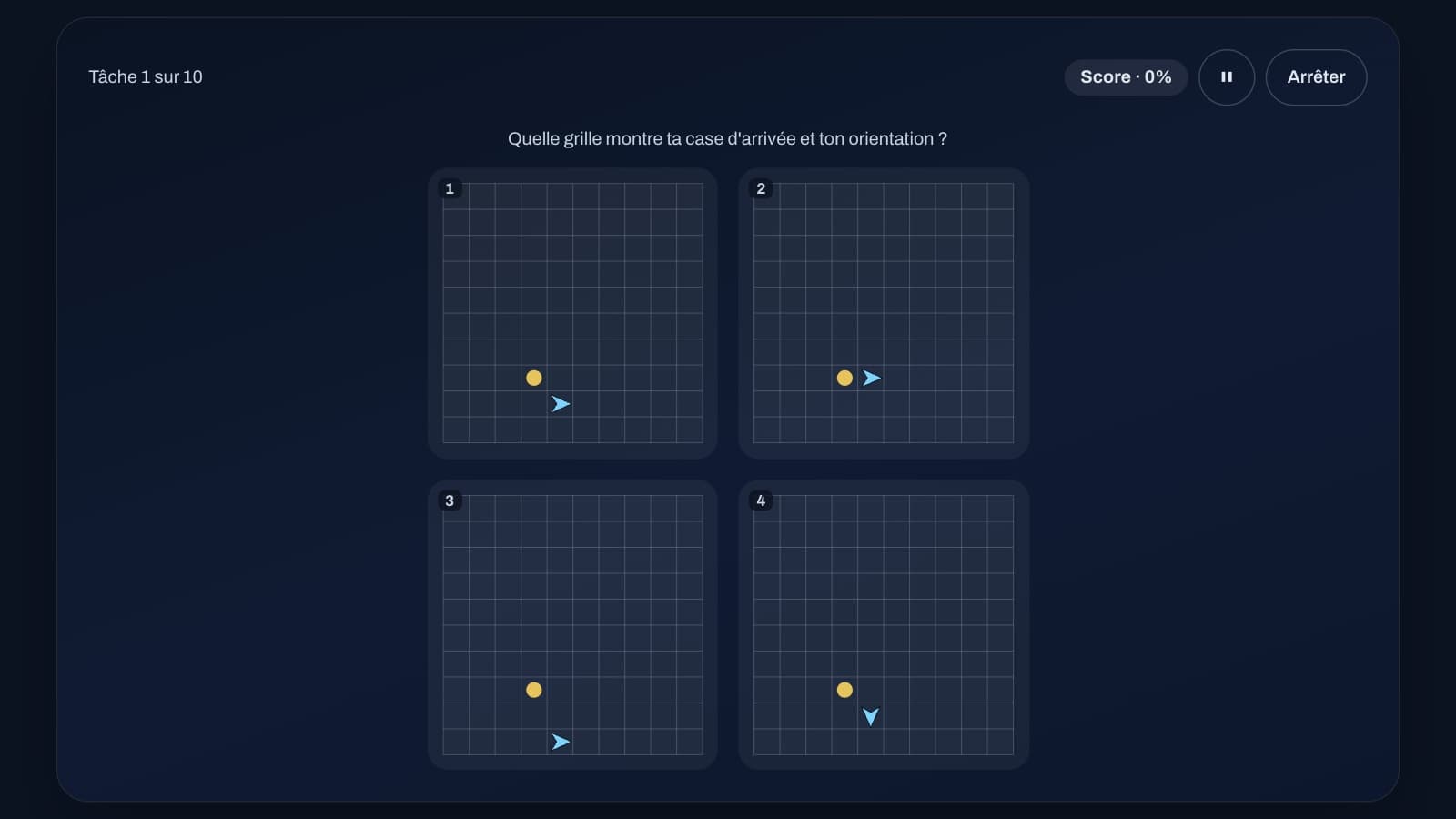
Two exercises in the DLR series train spatial orientation: in 2D, you mentally follow a path on a grid; in 3D, you memorise a sequence of faces and then find them on cubes drawn in perspective. In both cases, mistakes rarely come from faulty reasoning, but from information lost along the way. Here's how to hold on to it.
2D Spatial Orientation: The Principle
Each task starts from a square marked with a dot, on a 10 x 10 grid, and you're always facing upward at the start. Instructions then appear one after another: "Move forward", "Turn right and move forward", "Turn left and move forward", "Turn around and move forward". Each instruction moves you forward by a single square, and turns are made relative to your current heading, not relative to the screen.
Four grids then appear, each showing the starting point and an arrow: you must pick the one whose arrow is on the finishing square and pointing in the final heading. A series has 10 tasks, with 4 instructions for the first half and 5 for the second half, with no time limit to answer; the feedback screen traces the correct path.

2D: Keeping Two Things Updated — the Square and the Heading
Don't try to replay the whole path from the start after every instruction: keep track of just two pieces of information, a position count ("two to the right, one up") and the direction you're facing. For each instruction, first update the direction, then move forward one square in that new direction.
The classic trap is turning relative to the screen: if you're facing downward, "turn right" sends you toward the left of the screen. A simple way to avoid this is to picture the arrow rotating on itself, rather than thinking in terms of up, down, left, right. The wrong answers on offer are precisely plausible mistakes: a reversed turn, a step skipped or done twice, a missed about-turn, or the right square with the wrong direction. So check the arrow just as carefully as the square.
3D Spatial Orientation: The Principle
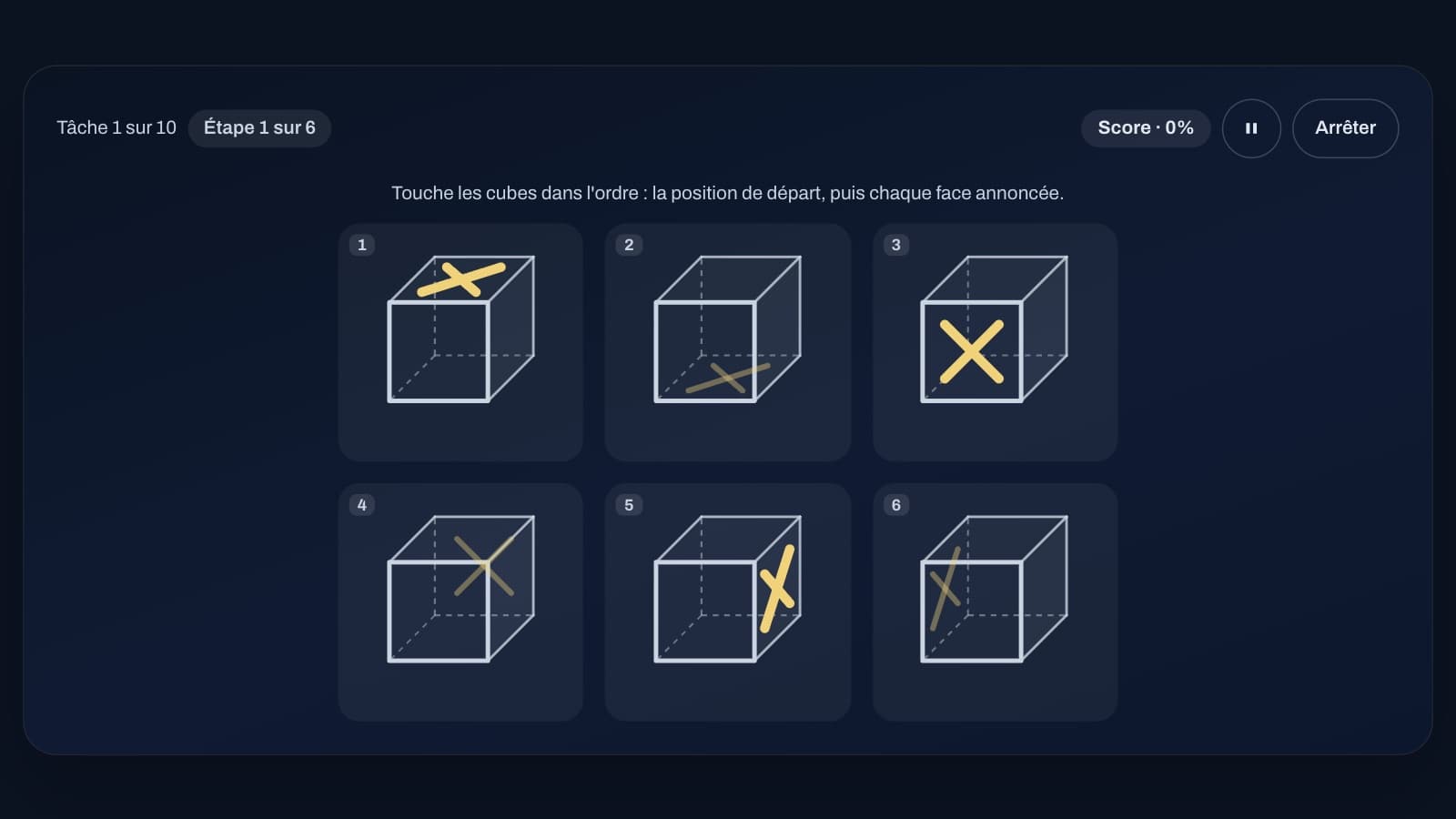
Each task begins with a starting position, a face of the cube (top, bottom, front, back, left or right), then five faces are announced one after another, never the same one twice in a row. Six drawings of the same cube then appear, each with a cross on a different face: you must touch, in order, the cube showing the starting face, then the cube for each announced face — six steps in total.
The faces turned toward you (front, top, right) carry a bold cross; the other three are seen through the cube by transparency, with a faint cross. Face names are hidden while you answer, and the arrangement of the six cubes changes with every task. A mistake stops the task and shows the feedback; scoring is based on the 60 steps across a series of 10 tasks.
3D: Repeat the Sequence, Then Read the Cubes
The only thing to hold on to during the announcements is the sequence of six words. Repeat it from the beginning with each new word ("back, right, left..."): this is safer than simply tacking the last word onto a list you never go back over.
Once the cubes appear, start by quickly spotting where each cross falls, once and for all: a faint cross is on a hidden face (back, bottom or left), a bold cross on a visible face. Only then run through your sequence and touch the cubes one by one. If you hesitate between two opposite faces (front and back, for example), check whether the cross is faint or bold: that's what tells them apart.
The Most Common Mistakes
In 2D, the most common mistake is turning relative to the screen instead of relative to your current heading, especially after an about-turn: once you're facing downward, left and right are reversed on screen. Next come skipping a step (each instruction, including turns, moves you forward one square) and picking the right square with the wrong arrow.
In 3D, the typical mistake is confusing two opposite faces — front and back, top and bottom, right and left: on the drawing, their crosses fall in almost the same spot, one bold, the other faint. The other trap is losing track of a word in the sequence while searching for the cube matching the previous word — which is why it pays to spot all six crosses clearly before you start touching.
A Simple Training Plan
Start with 2D spatial orientation, which has no time limit for answering: run a few series, checking every piece of feedback where the correct path is traced, until you stop getting the direction wrong. Then move on to 3D spatial orientation, aiming first for fully correct tasks rather than speed.
One or two series of each, several days in a row, beat one long session: these exercises demand short but intense concentration. And to mix things up, add in cube folding or the rotating maze, which train the same ability in a different way.
Other Spatial Exercises in the Series
Cube folding and the rotating maze train the same ability from a different angle: mentally folding a die from its net, and finding your way around a grid drawn from a changing angle. Alternating between these four exercises from one session to the next is more effective than repeating just one.
These exercises are included with the ATPL subscription: they are training tools, not official tests, with no connection to the selection test of any school, organisation or airline, and the exact rules or scoring of a real selection process may differ.